What to Record When a Game or Payment Problem Happens
88KA Game Troubleshooting: Record Details Before Contacting Support
An error message can disappear after you close an app. A payment receipt may be difficult to find later. When something goes wrong while using 88KA, collect the details you can safely see before restarting or trying the same action again. This makes it easier to explain the problem to the service responsible for the account. It also helps you avoid duplicate payments and vague reports such as “it did not work.” You do not need to share your password, OTP, or full identity details to describe what happened.
Start with the exact problem
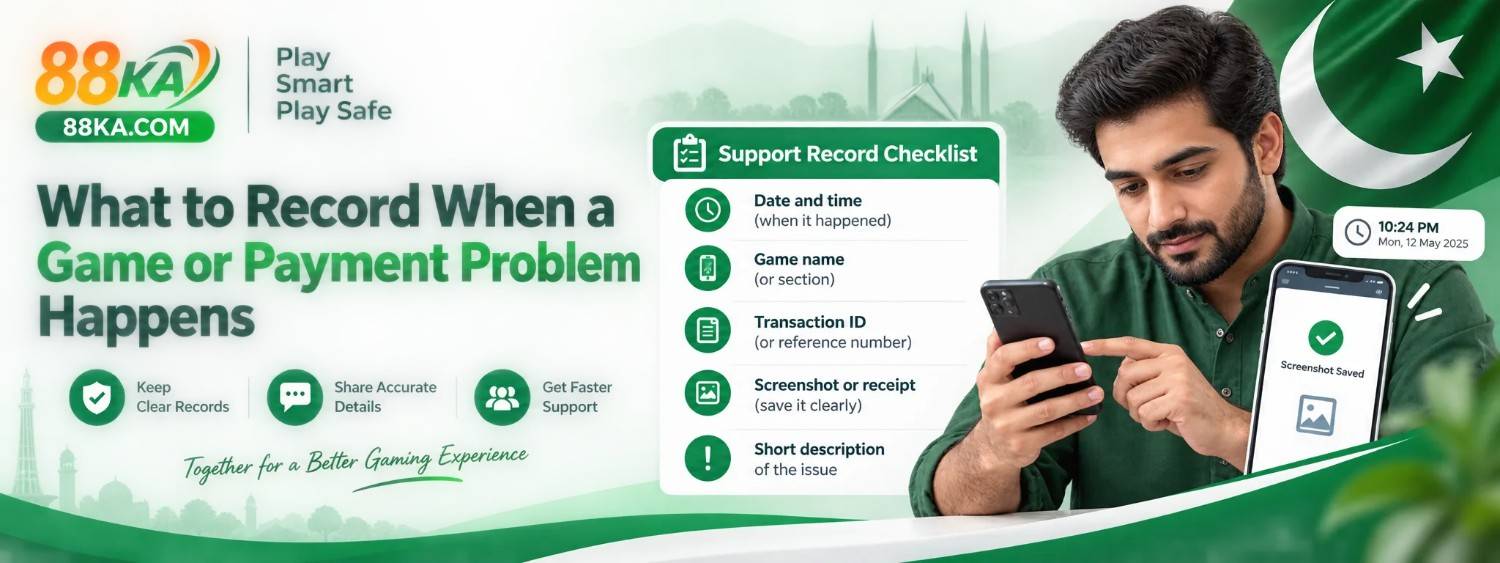
Write one short sentence describing what you expected and what happened instead. For example: “I completed a transfer, but the wallet balance has not changed,” or “The app closed after I tapped the game button.” Record the date and time shown on your phone and the exact error text if there is one.
This detail matters because a login error, a delayed deposit, and a game that will not load may have different causes and different support routes. Avoid guessing that an account has been banned or a payment has been lost until the responsible service confirms its status.
Capture a useful screenshot
Take a screenshot of the error, transaction status, or app screen where the issue appears. Crop or cover private details before sharing it. A screenshot should show enough context to identify the problem without exposing a password, OTP, full wallet number, or other sensitive information.
For a game issue, note the game title, the action you took, and whether the problem happened once or repeatedly. For a technical issue, record your Android version, app version if visible, and whether the issue occurs on both mobile data and Wi-Fi. Do not install a random “fix” sent by someone in a chat.
For a deposit or withdrawal
Keep the payment provider’s receipt and transaction reference. Note the amount, date, payment method, and status shown inside the app. Check your own payment account before assuming that an instruction completed. If a deposit is pending, do not send it again just because the app balance has not updated. Repeating a transfer can create a second charge.
For a withdrawal, check the status and any processing period displayed by the service. If a promotion is involved, read its current conditions to see whether they affect withdrawal eligibility. Our separate deposit and withdrawal guide explains the general steps, but only the operator or payment provider can inspect a specific transaction.
Choose the right support channel
App account, balance, and payment issues belong with verified app support or the payment provider. A typo or broken link on 88ka.com.pk belongs with this website’s Contact page. The two are different: this information website cannot release a payment or reset an app account.
Send a short report with the relevant time, error, and reference. Ask for a case number if the support channel provides one. Keep a copy of the conversation and follow up through the same verified channel rather than messaging several unknown profiles.
Before trying again
Once you have recorded the details, check your connection and whether the app needs a verified update. Restarting a phone may solve a temporary display problem, but it does not reverse a completed transfer. If money is involved, check the transaction status first. Never share a code or pay an extra “release fee” requested by an unverified person to fix the issue.